Create exam simulations with Killer Coda

Hands-on vs learning theory
From anecdotal evidence, I’ve always suspected that the average engineer dislikes learning from theory and text books, and vastly prefers hands-on learning. Personally I prefer to learn the theory first, then hands-on, then fall back to theory when I’m going deeper.
I polled a field of 80 SE’s on a recent call.
- About half (39/80) said that they learned AI by building something on their own.
- When asked for most vs least effective learning methods:
- the majority (44/69) said that building something themselves was most effective
- the majority (38/66) said that instrustor-led training was the least effective
To that end, I want to train the field on Kubernetes with a mix of coursework (using Coursera), instructor-assisted learning with directions, and some hands-on labs.
Why Killer Coda?
In an ideal world, I’d find a pre-existing practice exam that was 100% aimed at what I think F5 SE’s need to know. But I haven’t, and since everyone likes practice exams, I think I can make my own.
Killer Coda is free for creators and end-users alike. Creators can create scenarios and courses and share them with the public, all without subscribing. I’d be happy to subscribe personally, and may do so in future. A PLUS Membership gets you faster load times and prioritized support, as well as a few other benefits.
How to create your own labs.
Long story short, they have good documentation here. I will just say:
- you need:
- a github repo
- a Deploy Key (even if your repo is public, so that Killercoda can access your repo without getting rate limited as anonymous requests do)
- a webhook set up (so GitHub can alert Killercoda when a commit is made)
- for me, just getting started, I recommend copying a very basic example scenario directly into your repo and playing around
- don’t try to make a perfect lab in your first commit (like I did). Waste of time, just iterate.
My first scenario:
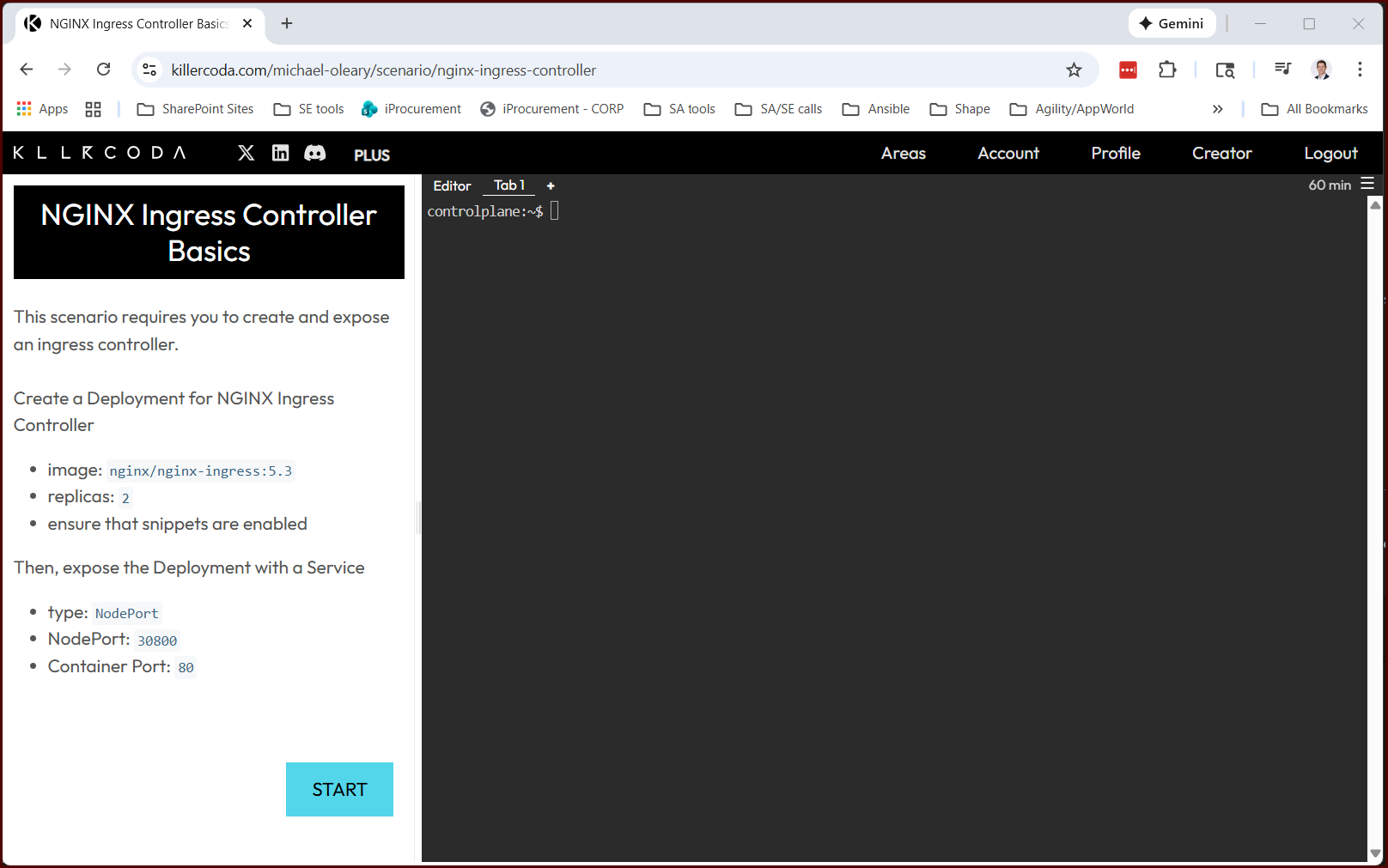
Other platforms
I do plan to explore some other platforms after this too. Here’s a summary table of some free options. (Disclaimer: I generated this table with ChatGPT.)
| Platform | What It Is | Free Hands-On Features | Best Paired With Structured Learning | Limitations |
|---|---|---|---|---|
| Killercoda | Browser-based Kubernetes scenario labs | Real Kubernetes CLI environments; task-driven scenarios; no local setup | Kubernetes courses, docs, or certification study plans (CKA/CKAD/CKS) | No built-in curriculum; scenario coverage varies |
| Play with Kubernetes (PWK) | Temporary Kubernetes sandbox | On-demand multi-node clusters; full kubectl access | Tutorials, blogs, or instructor-led material that needs a live cluster | Sessions are time-limited; no guidance or assessment |
| LabEx (Free Kubernetes Labs) | Interactive Kubernetes labs & playground | Browser-based clusters; guided hands-on exercises | Intro/intermediate Kubernetes learning paths | Less certification-focused; fewer advanced scenarios |
| IBM CloudLabs (Kubernetes) | Guided, cloud-hosted Kubernetes labs | Step-by-step interactive labs using managed Kubernetes | Structured lesson sequences or workshops | Requires free cloud account; limited lab selection |
| KodeKloud – Free Labs | Concept-aligned Kubernetes labs | Hands-on tasks mapped to Kubernetes topics | Kubernetes courses, certification prep outlines | Full lab catalog requires paid access |
| Google Cloud Skills Boost (Free Tier) | Cloud-based Kubernetes labs (GKE) | Free credits; guided labs and quests; real clusters | GKE tutorials, cloud-focused Kubernetes learning | Free access is credit-limited; GKE-specific focus |
Next steps
Next, I’m going to finish a very nice example that includes a startup script, a validation script, and multiple scenarios grouped into a single course. This should make it easy to copy in future.