Mulesoft + BIG-IP with OpenShift
Same edge pattern, a very different gateway — and a trail of real-world friction worth documenting
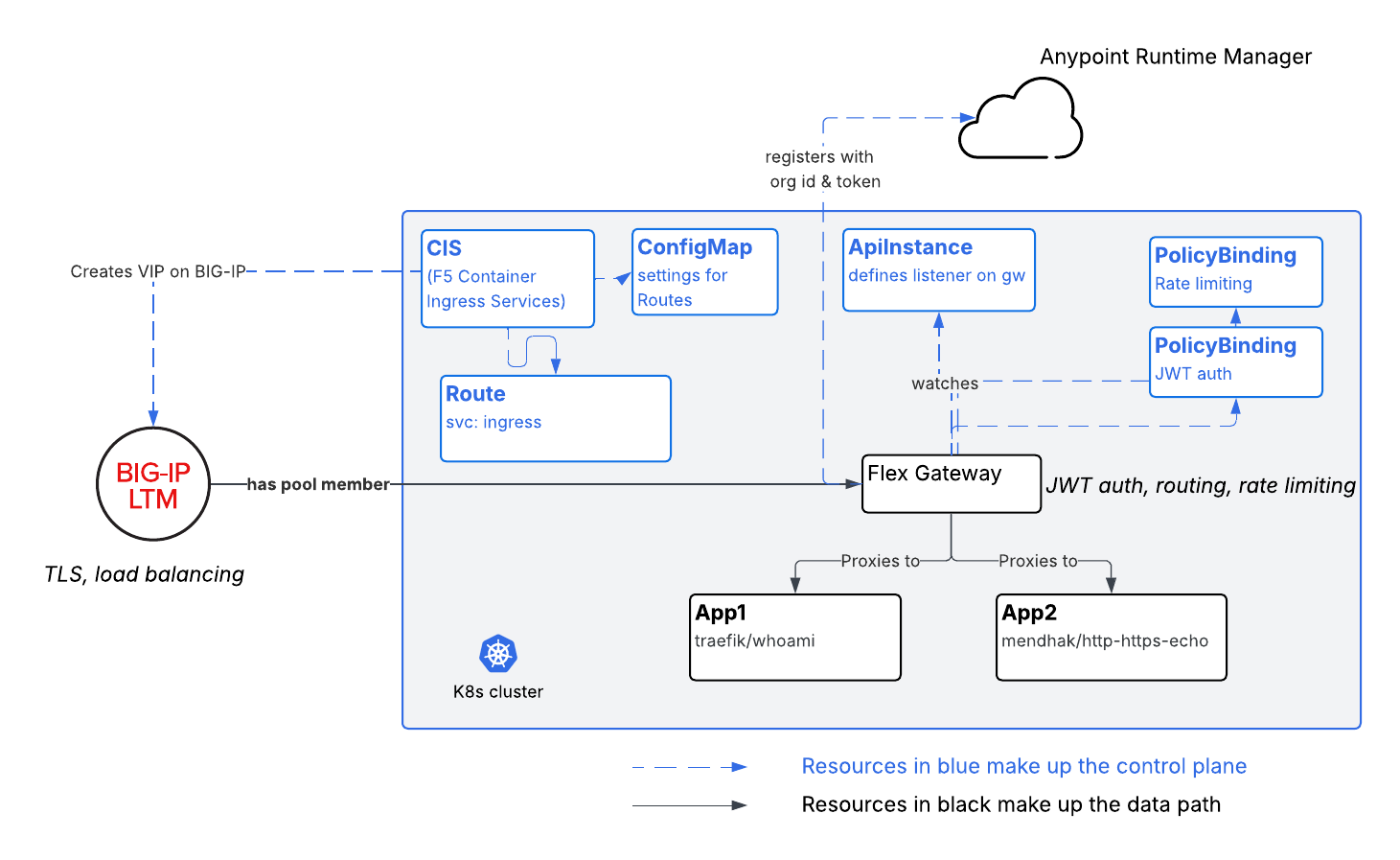
In an earlier post I put open-source Kong behind an F5 BIG-IP on OpenShift and showed the two are complementary: the ADC owns the edge (TLS, WAF, pod-direct load balancing), the gateway owns API management (routing, rate-limiting, auth). The whole point is that the pattern is modular — the edge layer and API gateway layer can be switched for alternatives.
I’ll show this again. This time the in-cluster gateway is MuleSoft Omni Gateway — the product formerly (and still, in most logs and docs) called Flex Gateway. Same BIG-IP, same CIS, same OpenShift cluster, same “client → BIG-IP → gateway → backends” architecture. Only the middle layer changed.
But where the Kong write-up was a clean “here’s the architecture” piece, this one is a field report. Omni Gateway on Kubernetes had some troubleshooting - at least for me, with a trial license, learning by doing. If you’re a platform engineer about to try this, the goal here is to save you that day.
The end state:
1
2
client ──HTTPS──▶ F5 BIG-IP ──HTTP──▶ Omni Gateway ──▶ backend apps
                  (TLS + LB via CIS)   (routing + rate-limit + JWT)
I stood up https://mulesoft.my-f5.com/, edge TLS on the BIG-IP, CIS configured with OpenShift Route, Omni Gateway enforcing path routing, rate limiting, and JWT auth against two backends on /a and /b.
A note on branding. “Omni Gateway” is the current name; “Flex Gateway” is what you’ll find in almost all documentation, the Helm chart (
flex-gateway), the container image (mulesoft/flex-gateway:1.13.3), and every log line (flex-gateway-agent,flex-gateway-envoy). If you’re searching for docs, search for Flex Gateway. I use “Omni Gateway” for the product and “Flex Gateway” wherever the software actually says so.
Part 1 — The setup journey
The trap: --connected=true
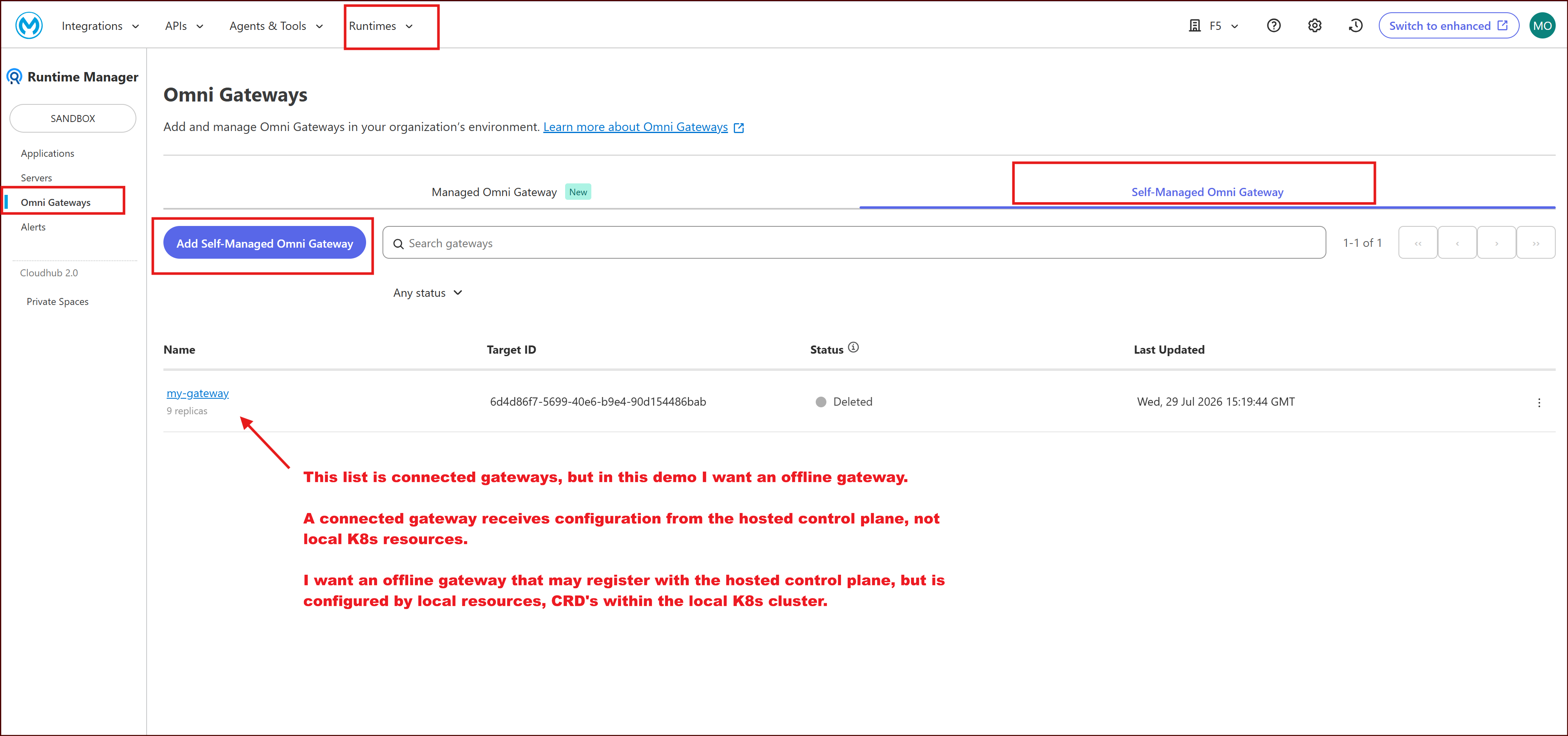
I created a trial login on https://anypoint.mulesoft.com/, logged into Anypoint platform, and clicked Runtimes > Runtime Manager > Omni Gateways > Self-Managed Gateways > Add Self-Managed Omni Gateway.
This gives me instructions to deploy a Gateway on Openshift. First step is to run a docker command that will generate a registration.yaml file to be used when deploying the gateway via helm. Token and Org GUID’s are populated - I’ve blurred my screenshots but you will have your own in your instructions.
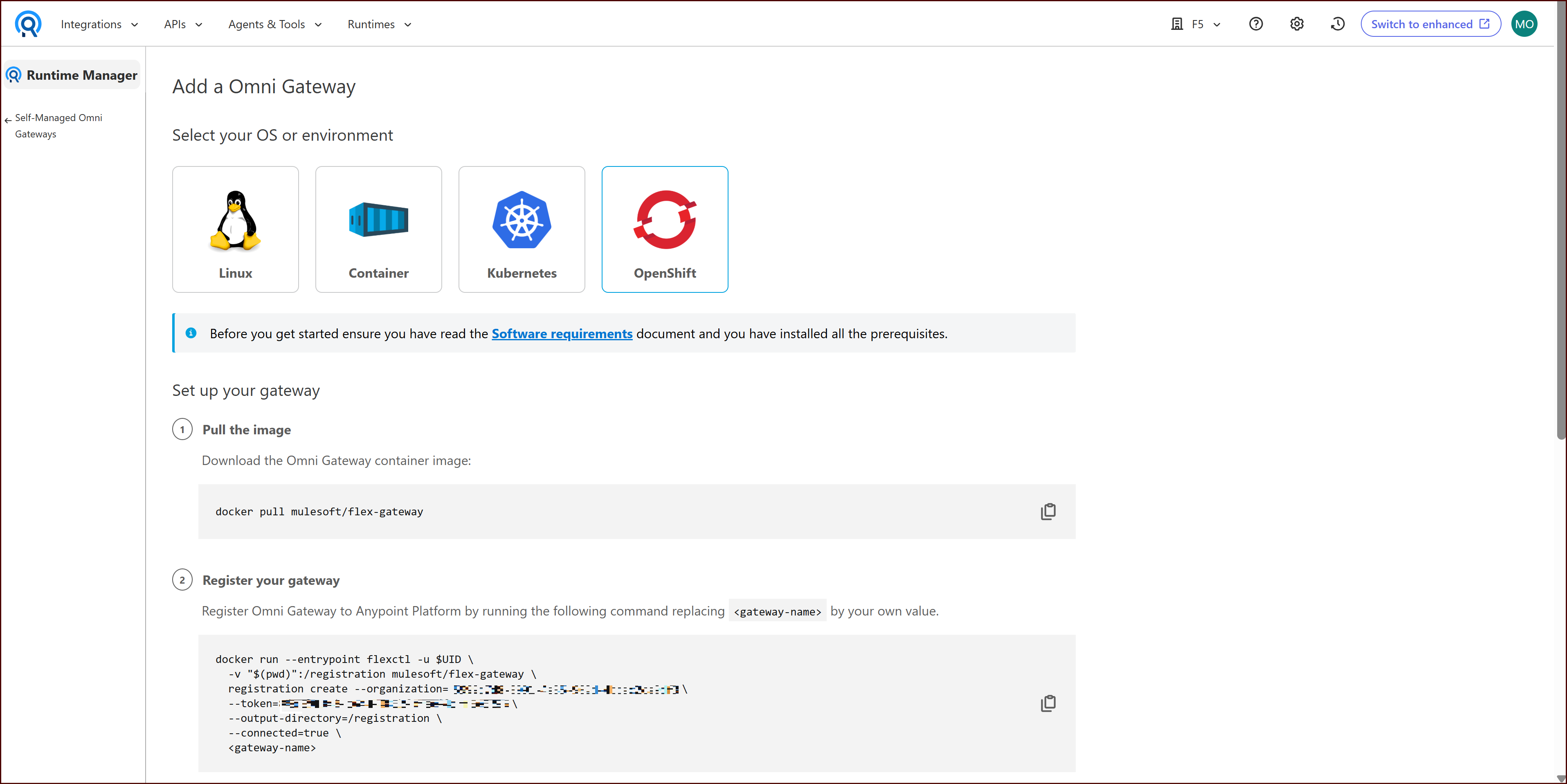
Note this line from the instructions in the screenshot:
1
--connected=true
I pasted it, registered, deployed the Helm chart, and the pod never went Ready in K8s. Not crash-looping — just a readiness probe that never passed. And the maddening part: the logs showed no errors. The container was up. The process was running. It simply wasn’t serving.
I did the whole checklist:
- SCC? Checked (it was a problem too — see below — but not this problem).
- kubectl describe Fine.
- Pod logs Nothing obvious I could see.
- DNS / service resolution? Clean.
The breakthrough came from reading the full startup log rather than grepping for error. In connected mode, the gateway expects its configuration to come down from the Anypoint control plane — API Manager contracts, Runtime Manager config. It is not looking at Kubernetes-native resources. So my ApiInstance and PolicyBinding CRDs were simply ignored, no listener was ever configured for them, and readiness — which depends on a configured listener — never flipped to true. No error, because from the gateway’s point of view nothing was wrong. It was patiently waiting for a control plane that was never going to talk to it.
The fix is to register in local mode instead:
1
2
3
4
5
6
7
8
# Registration is immutable per (name, org). You cannot flip an existing
# registration from connected to local — you must register a NEW name.
docker run --entrypoint flexctl -u $UID   -v "$(pwd)":/registration mulesoft/flex-gateway \
  registration create --organization=xxxxxxxx-xxxx-xxxx-xxxx-xxxxxxxxxxxx \
  --token=xxxxxxxx-xxxx-xxxx-xxxx-xxxxxxxxxxxx   \
  --output-directory=/registration   \
  --connected=false \ ## this line is key when creating your registration.yaml file.
  my-gateway3
Then deploy with the chart in local mode:
1
helm -n gateway upgrade -i --create-namespace ingress flex-gateway/flex-gateway   --set-file registration.content=registration.yaml
The learning: registration mode is the first architectural decision, and the most consequential one. connected vs local is not a fallback you can toggle later — it determines whether your gateway is configured by Anypoint contracts or by Kubernetes CRDs. Pick wrong and you get a silent readiness failure.
Bonus UX papercut — the vocabulary problem. This one setting has four names depending on where you look:
| Where | Term |
|---|---|
| Wizard / CLI flag | --connected=true/false |
| Helm value | gateway.mode=local |
| Older docs / deprecated flags | disconnected |
| Runtime logs | Mode=offline |
connected=false = mode=local = disconnected = offline. Same thing, four words. Worth knowing when you’re grepping logs.
The SCC storm
Once registration mode was fixed, the pod got further and then hit OpenShift’s Security Context Constraints — twice, in quick succession.
1. UID range. The gateway image wants to run as a specific built-in user. OpenShift’s default restricted-v2 SCC forces a randomized UID from the namespace’s allocated range and rejects the image’s requested UID.
2. Low-port binding. The gateway wants to bind privileged ports (< 1024). Doing that as a non-root user requires the NET_BIND_SERVICE Linux capability, and OpenShift’s default seccomp/capability posture drops it.
The fast way through — and what I did first to get unblocked — is to bind broad SCCs to the gateway’s ServiceAccount:
1
2
oc adm policy add-scc-to-user anyuid     -z ingress -n gateway
oc adm policy add-scc-to-user privileged -z ingress -n gateway
That works, but privileged is a sledgehammer and no security reviewer will sign off on it for production. The cleaner landing spot — which is what the running demo actually uses now — avoids privileged entirely by (a) running as nobody, (b) adding only the one capability that’s needed, and (c) using a sysctl to let a non-root process bind low ports:
1
2
3
4
5
6
7
8
9
10
11
12
13
14
15
16
# pod securityContext
securityContext:
  runAsNonRoot: true
  runAsUser: 65534                 # nobody
  seccompProfile:
    type: RuntimeDefault
  sysctls:
    - name: net.ipv4.ip_unprivileged_port_start
      value: "0"                   # allow unprivileged bind to low ports
---
# container securityContext
securityContext:
  allowPrivilegeEscalation: false
  capabilities:
    add: ["NET_BIND_SERVICE"]
    drop: ["ALL"]
The even simpler move — and the one I’d recommend if you control the values file — is to sidestep the whole low-port fight by not using low ports at all (see the :8081 decision in Part 3). Then you don’t need NET_BIND_SERVICE, the sysctl, or privileged.
Why this matters: SCCs and Pod Security Standards are constraints, not misconfigurations. They’ll bite you in any hardened Kubernetes environment, not just OpenShift. Budget time for them as a setup prerequisite, and reach for a minimal custom SCC (or a high port) before you reach for privileged.
Part 2 — The architecture
Three layers, each independently testable, each ignorant of the others’ internals.
1
2
3
4
5
6
7
8
9
10
11
12
13
14
15
16
17
18
19
20
21
┌───────────────────────────────────────────────────────────────────┐
│ Layer 1 — Network / edge  (F5 BIG-IP via CIS)                       │
│   • TLS termination (self-signed cert for this demo)                │
│   • Pod-direct load balancing to the gateway (pool = pod IPs:8081)  │
│   • WAF attach point (present via Policy CR; not exercised here)     │
└───────────────────────────────────────────────────────────────────┘
                                 │  HTTP :8081
                                 ▼
┌───────────────────────────────────────────────────────────────────┐
│ Layer 2 — API gateway  (MuleSoft Omni Gateway v1.13.3, local mode)  │
│   • Path routing:  /a → app-a,  /b → app-b                          │
│   • Rate limiting: 5 requests / 10 s, keyed on client IP            │
│   • JWT validation: HS256 bearer token, offline (no API Manager)    │
└───────────────────────────────────────────────────────────────────┘
                                 │  HTTP :8080
                                 ▼
┌───────────────────────────────────────────────────────────────────┐
│ Layer 3 — Backends  (namespace mulesoft-demo, 2 replicas each)      │
│   • app-a: traefik/whoami           (echoes request/pod metadata)   │
│   • app-b: mendhak/http-https-echo  (echoes headers + body)         │
└───────────────────────────────────────────────────────────────────┘
The gateway lives in namespace gateway; the backends live in mulesoft-demo. BIG-IP routes on hostname to the Mulesoft gateway.
The BIG-IP doesn’t know what’s behind the gateway. The gateway doesn’t know a BIG-IP exists.
Here’s the running environment:
1
2
3
4
5
6
7
8
9
10
11
12
13
14
15
16
$ oc get pods -n gateway -o wide
NAME                      READY   STATUS    RESTARTS   AGE     IP            NODE
ingress-f88b6c598-txxlk   1/1     Running   1          4d21h   10.129.0.19   ip-10-0-2-184...

$ oc get pods -n mulesoft-demo -o wide
NAME                     READY   STATUS    RESTARTS   AGE     IP            NODE
app-a-6fb74c6c6c-9qvj9   1/1     Running   1          4d19h   10.129.0.26   ip-10-0-2-184...
app-a-6fb74c6c6c-nxhvh   1/1     Running   1          4d19h   10.129.0.24   ip-10-0-2-184...
app-b-5ff456446f-txr29   1/1     Running   1          4d19h   10.129.0.27   ip-10-0-2-184...
app-b-5ff456446f-w87kj   1/1     Running   1          4d19h   10.129.0.28   ip-10-0-2-184...

$ oc get svc -n gateway
NAME           TYPE        CLUSTER-IP       PORT(S)
ingress        ClusterIP   172.30.194.53    80/TCP,443/TCP
ingress-8081   ClusterIP   172.30.137.137   8081/TCP        # <- the demo listener
ingress-hl     ClusterIP   None             <none>
The pod is named
ingressbecause that’s the Helm release name for the Flex/Omni gateway chart — don’t let it fool you into thinking it’s the OpenShift ingress router. The single container is namedapp, and the workload’s label selector isapp=ingress(notapp.kubernetes.io/name=flex-gateway, which some docs imply — worth checking withoc get svc <svc> -o jsonpath='{.spec.selector}'before you write a NetworkPolicy or a CIS selector against it).
Part 3 — MuleSoft Omni Gateway configuration deep dive
Everything here is done the Kubernetes-native way: ApiInstance for the listener + routing, PolicyBinding for policy. That’s exactly why local mode matters — in connected mode these CRDs are ignored.
Getting routing right: the ApiInstance
First friction point: kubectl explain wasn’t helpful. The published examples I found show one structure but I had to do slightly differently than what I found. Here’s the structure that works on v1.13.3:
1
2
3
4
5
6
7
8
9
10
11
12
13
14
15
16
17
18
apiVersion: gateway.mulesoft.com/v1alpha1
kind: ApiInstance
metadata:
  name: demo-api
  namespace: gateway
spec:
  address: http://0.0.0.0:8081        # listen on :8081 — see the port note below
  services:
    backend-a:
      address: http://app-a.mulesoft-demo.svc.cluster.local:8080
      routes:
        - rules:
            - path: /a
    backend-b:
      address: http://app-b.mulesoft-demo.svc.cluster.local:8080
      routes:
        - rules:
            - path: /b
Why
:8081? The Helm chart already stands up listeners on:80and:443(you’ll seeApiInstance/ingress-httpandingress-httpsin the namespace). Rather than fight those — and rather than deal with the low-port SCC drama from Part 1 — I gave the demo API its own listener on a high port. Cleaner, and it sidestepsNET_BIND_SERVICEentirely.
Prove routing works before you add a single policy. Port-forward to the listener and hit each path:
1
2
3
4
oc port-forward -n gateway svc/ingress-8081 18081:8081 &

curl -s http://localhost:18081/a   # -> app-a (traefik/whoami)
curl -s http://localhost:18081/b   # -> app-b (mendhak/http-https-echo)
/a returns a whoami dump (hostname, pod IPs, request headers); /b returns the echo server’s JSON. Once that’s solid, layer policy on top.
The schema mismatch: Extension definitions vs. PolicyBinding reality
Here’s the one that will cost you the most time if you’re not warned. I could not find a way to learn the expected schema or Mulesoft CRD’s. Check this out:
1
2
3
4
5
6
7
8
9
10
11
12
13
14
15
16
17
18
19
20
21
22
23
24
25
26
27
28
29
30
31
32
33
34
35
36
37
38
39
ubuntu@ubuntu-Virtual-Machine:~/mulesoft/cis-resources$ kubectl get crd policybindings.gateway.mulesoft.com -o yaml
apiVersion: apiextensions.k8s.io/v1
kind: CustomResourceDefinition
metadata:
  creationTimestamp: "2026-07-22T20:38:50Z"
  generation: 1
  name: policybindings.gateway.mulesoft.com
  resourceVersion: "829989"
  uid: c3fffbe6-9644-477f-bf3f-3ee953f12bf2
spec:
  conversion:
    strategy: None
  group: gateway.mulesoft.com
  names:
    kind: PolicyBinding
    listKind: PolicyBindingList
    plural: policybindings
    singular: policybinding
  scope: Namespaced
  versions:
  - additionalPrinterColumns:
    - description: The target to apply the Policy
      jsonPath: .spec.targetRef.name
      name: Target
      type: string
    - description: The Policy to apply
      jsonPath: .spec.policyRef.name
      name: Policy
      type: string
    name: v1alpha1
    schema:
      openAPIV3Schema:
        properties:
          spec:
            x-kubernetes-preserve-unknown-fields: true
        type: object
    served: true
    storage: true
......[redacted status fields].....
The key section is below.
1
2
3
4
5
6
    schema:
      openAPIV3Schema:
        properties:
          spec:
            x-kubernetes-preserve-unknown-fields: true
        type: object
This means that you can put anything in the CRD and it’s treated as valid by kubectl. That’s bad - I had no real way of troubleshooting my CRD’s. Perhaps these are just the CRD’s installed by Helm, but this is not helpful.
The only reliable method I found was to switch to a different AI model that I had helping me :)
But AI’s suggestion as I’m writing this blog post is now: pull the definition off the pod, then build the binding empirically against a minimal working example.
1
2
3
POD=$(oc get po -n gateway -l app=ingress -o name | head -1)
oc exec -n gateway $POD -- \
  cat /etc/mulesoft/flex-gateway/conf.d/policies/definitions/rate_limit_definition.yaml
Read it for the property meanings, not as gospel for field names and nesting. Then test.
Rate limiting — the complete working binding
1
2
3
4
5
6
7
8
9
10
11
12
13
14
15
16
17
18
apiVersion: gateway.mulesoft.com/v1alpha1
kind: PolicyBinding
metadata:
  name: demo-rate-limit
  namespace: gateway
spec:
  policyRef:
    name: rate-limiting-flex        # NOT "rate-limit"
  targetRef:
    kind: ApiInstance               # required — not optional
    name: demo-api
  config:
    rateLimits:                     # keySelector/exposeHeaders/clusterizable
      - maximumRequests: 5          # live INSIDE this array item
        timePeriodInMilliseconds: 10000
        exposeHeaders: true
        clusterizable: false        # false for this single-replica demo; true in prod
        keySelector: "#[attributes.clientAddress.ip]"   # rate-limit per client IP
Test it — five in, then rejections:
1
2
3
4
5
6
7
8
9
10
11
12
13
14
15
16
$ for i in $(seq 1 10); do
    curl -s -o /dev/null -w "req $i -> %{http_code}\n" localhost:18081/a
  done
req 1 -> 200
req 2 -> 200
req 3 -> 200
req 4 -> 200
req 5 -> 200
req 6 -> 429
req 7 -> 429
req 8 -> 429
req 9 -> 429
req 10 -> 429

$ curl -s localhost:18081/a          # body once the budget is spent
{"error":"Too Many Requests"}
Gotchas that actually cost me time:
keySelectoris effectively required. Leave it off and the policy loads happily but the enforcement behavior is not what you expect. Set it explicitly.- It’s
attributes.clientAddress.ip, notattributes.request.ip. Wrong expression → no useful key. targetRef.kind: ApiInstanceis mandatory. Omit it and the binding won’t attach.- Honesty check on
exposeHeaders. I setexposeHeaders: trueexpectingRateLimit-Limit/RateLimit-Remaining/RateLimit-Resetheaders on allowed responses. On v1.13.3 in this local-mode setup I did not see them emitted on the 200s — the enforcement (200→429) is rock solid, but the informational headers didn’t surface for me. If your clients depend onRateLimit-*headers to self-throttle, validate that behavior on your version before you promise it downstream.
JWT validation
This is where I’ll correct my own initial notes. If you follow blog posts (including drafts of this one) that show jwtSigningMethod, jwtSigningKeyLength, and jwtKey, the binding will not behave. The actual working field names on v1.13.3 are signingMethod, signingKeyLength, and textKey:
1
2
3
4
5
6
7
8
9
10
11
12
13
14
15
16
17
18
19
20
apiVersion: gateway.mulesoft.com/v1alpha1
kind: PolicyBinding
metadata:
  name: demo-jwt-auth
  namespace: gateway
spec:
  policyRef:
    name: jwt-validation-flex       # NOT "jwt-validation"
  targetRef:
    kind: ApiInstance
    name: demo-api
  config:
    signingMethod: hmac             # not "jwtSigningMethod"
    signingKeyLength: 256           # not "jwtSigningKeyLength"
    jwtKeyOrigin: text
    textKey: "12345678901234567890123456789012"   # not "jwtKey"; plain text, NOT base64
    jwtOrigin: httpBearerAuthenticationHeader
    validateAudClaim: false
    mandatoryExpClaim: true
    skipClientIdValidation: true
Generate a token (standard PyJWT):
1
2
3
4
import time, jwt
now = int(time.time())
payload = {"sub": "test", "iat": now, "nbf": now, "exp": now + 3600}  # 1-hour expiry
print(jwt.encode(payload, "12345678901234567890123456789012", algorithm="HS256"))
Test the three cases:
1
2
3
4
5
6
7
8
9
10
11
12
$ curl -s -o /dev/null -w "%{http_code}\n" localhost:18081/a
400                                   # no token
$ curl -s localhost:18081/a
{"error":"JWT Token is required."}

$ curl -s -o /dev/null -w "%{http_code}\n" \
    -H "Authorization: Bearer $TOKEN" localhost:18081/a
200                                   # valid token → whoami

$ curl -s -o /dev/null -w "%{http_code}\n" \
    -H "Authorization: Bearer not.a.real.token" localhost:18081/a
401                                   # bad token
Note the status semantics: missing token is 400 (malformed request), present-but-invalid is 401 (unauthorized). Some clients treat those very differently.
Why plain-text textKey, not base64
The jwtKeyOrigin field selects how the key is interpreted:
text— the key is a literal string (correct for HMAC / HS256).jwks— the key is a URL to a JWKS endpoint (for RS/ES asymmetric keys).customExpression— the key comes from a DataWeave expression.
For HS256 use text and supply the secret as-is, in plain text. If you base64-encode it out of habit, the policy tries to interpret the decoded bytes as a PEM key and fails with:
1
Error generating PEM InvalidData(InvalidByte(4, 45))
That error is a red herring the first time you see it — it looks like a certificate problem, but the real cause is “you gave me base64 and text origin.” Keep the secret plain.
The 32-bit WASM timestamp gotcha
Flex/Omni Gateway runs each policy as a WebAssembly module (wasm32-unknown-unknown) inside Envoy. The jwt-validation policy is Rust compiled to that 32-bit WASM target, and its claim-parsing code calls .unwrap() on a timestamp conversion. Feed it an exp that’s large enough to overflow the conversion and the .unwrap() panics on None, which traps the WASM module on an unreachable instruction — and the gateway returns 503 for that request.
I mapped the boundary empirically on v1.13.3 by walking exp upward:
1
2
3
4
5
6
7
exp = 2147483647   (2^31-1, "2038")  -> HTTP 200   # accepted
exp = 2147483648                      -> HTTP 200
exp = 4294967295   (2^32-1)           -> HTTP 200
exp = 4294967296   (2^32)             -> HTTP 200
exp = 5000000000                      -> HTTP 200
exp = 9999999999                      -> HTTP 503   # panic
exp = 99999999999                     -> HTTP 503
So — and this corrects the common “it breaks at 2038 / 2³¹” claim — on this version the wall sits above 2³², somewhere between 5×10⁹ and ~10¹⁰, not at the signed-32-bit 2038 boundary. Wherever exactly the threshold is, the point stands: unrealistically large exp values crash the request.
The smoking gun, straight from oc logs deploy/ingress:
1
2
3
4
5
6
7
8
[flex-gateway-envoy][critical] wasm log demo-jwt-auth ...
  panicked at .../jwt-lib/src/model/claims.rs:340:65:
  called `Option::unwrap()` on a `None` value
[flex-gateway-envoy][error] Function: proxy_on_request_headers failed:
  ... jwt_validation.wasm!..extract_datetime_value ...
      jwt_validation.wasm!..JWTClaims::new ...
Caused by:
  wasm trap: wasm `unreachable` instruction executed
extract_datetime_value → .unwrap() on None → abort → unreachable. That’s a shipping robustness bug: the policy should clamp or reject an out-of-range timestamp gracefully, not abort the WASM VM and 503 the caller.
The fix is boring and correct: use realistic Unix timestamps. now + 3600 for a one-hour token is fine. You only hit this if you (or a buggy token minter) emit absurd expiries — but it’s exactly the kind of thing a fuzzer or a copy-pasted “never expires” hack will trigger in the wild, so it’s worth knowing the failure mode is a 503, not a clean 401.
Part 4 — F5 CIS integration
The reader here is assumed to know F5, so this is deliberately brief — the CIS side is nearly identical to the Kong post. What changed is that this cluster drives BIG-IP config from an OpenShift Route plus an extended-spec ConfigMap, rather than a VirtualServer CRD.
CIS runs in kube-system, watching the relevant namespaces, in OpenShift controller mode with cluster (pod-direct) pool members:
1
2
3
4
5
6
7
8
9
$ oc get deploy f5cis-f5-bigip-ctlr -n kube-system \
    -o jsonpath='{.spec.template.spec.containers[0].args}'
--bigip-partition=openshift
--bigip-url=10.0.4.11
--controller-mode=openshift
--pool-member-type=cluster        # pool members = pod IPs, not NodePorts
--orchestration-cni=ovn-k8s
--static-routing-mode=true
--namespace=kube-system --namespace=gateway --namespace=mulesoft-demo
pool-member-type=cluster with orchestration-cni=ovn-k8s and static-routing-mode=true is what gives us pod-direct load balancing on OVN-Kubernetes: BIG-IP balances straight across the gateway’s pod IPs, no NodePort or router hop, and pool membership tracks pods automatically.
The Route (edge TLS decryption, HTTP→HTTPS redirect, targeting the :8081 Service):
1
2
3
4
5
6
7
8
9
10
11
12
13
14
15
16
17
18
19
apiVersion: route.openshift.io/v1
kind: Route
metadata:
  name: mulesoft-route
  namespace: gateway
  labels:
    f5type: systest                 # picked up by CIS
spec:
  host: mulesoft.my-f5.com
  path: /
  port:
    targetPort: 8081
  tls:
    termination: edge
    insecureEdgeTerminationPolicy: Redirect
  to:
    kind: Service
    name: ingress-8081
    weight: 100
The extended-spec ConfigMap pins the VIP, partition, and a Policy CR (TCP profiles + SNAT; the WAF attach point lives here too):
1
2
3
4
5
6
extendedRouteSpec:
  - namespace: gateway
    vserverAddr: 10.0.0.101           # the BIG-IP VIP
    vserverName: mulesoft-demo-routes
    bigIpPartition: mulesoft-demo
    policyCR: kube-system/security-policy
A quick confirmation that BIG-IP actually admitted the Route — note it’s admitted by two routers, the OpenShift default and F5 BIG-IP (CIS):
1
2
3
$ oc get route mulesoft-route -n gateway -o jsonpath='{range .status.ingress[*]}{.routerName}{"\n"}{end}'
default
F5 BIG-IP
Put together, the flow is:
1
2
3
4
5
Internet ─▶ BIG-IP VIP  mulesoft.my-f5.com : 443
         ─▶ TLS decrypt (edge policy on the Route)
         ─▶ CIS pod-direct routing to gateway pod IP : 8081
         ─▶ Omni Gateway  (JWT + rate-limit)
         ─▶ backend  /a (app-a)  or  /b (app-b)
Cert caveat. This demo terminates TLS with the BIG-IP’s default self-signed cert (
CN=localhost.localdomain), which is why everycurlbelow uses-k. Use a real, trusted certificate in production.
Part 5 — End-to-end testing (layered, so failures are localized)
The value of the three-layer design is that you can test each layer in isolation. If layer N misbehaves, the bug is in N — not upstream.
Layer 1 — gateway routing only (port-forward, no edge):
1
2
curl -s localhost:18081/a   # app-a
curl -s localhost:18081/b   # app-b
Layer 2 — rate limiting (port-forward):
1
2
$ for i in $(seq 1 10); do curl -s -o /dev/null -w "%{http_code} " localhost:18081/a; done
200 200 200 200 200 429 429 429 429 429
Layer 3 — JWT (port-forward):
1
2
3
$ curl -s -o /dev/null -w "%{http_code}\n" localhost:18081/a                              # 400 (no token)
$ curl -s -o /dev/null -w "%{http_code}\n" -H "Authorization: Bearer $TOKEN"   localhost:18081/a   # 200
$ curl -s -o /dev/null -w "%{http_code}\n" -H "Authorization: Bearer garbage"  localhost:18081/a   # 401
Layer 4 — the whole stack through BIG-IP (https://mulesoft.my-f5.com, self-signed → -k):
1
2
3
4
5
6
7
8
9
10
11
12
13
14
15
16
17
18
19
20
21
22
23
24
25
26
27
28
29
30
31
32
33
# no token
$ curl -sk -o /dev/null -w "%{http_code}\n" https://mulesoft.my-f5.com/a
400
$ curl -sk https://mulesoft.my-f5.com/a
{"error":"JWT Token is required."}

# invalid token
$ curl -sk -o /dev/null -w "%{http_code}\n" -H "Authorization: Bearer bad" https://mulesoft.my-f5.com/a
401
$ curl -sk -H "Authorization: Bearer bad" https://mulesoft.my-f5.com/a
{"error":"Invalid token."}

# valid token → routed to app-a (whoami)
$ curl -sk -H "Authorization: Bearer $TOKEN" https://mulesoft.my-f5.com/a
Hostname: app-a-6fb74c6c6c-nxhvh
IP: 10.129.0.24
GET /a HTTP/1.1
Host: app-a.mulesoft-demo.svc.cluster.local
...

# valid token → routed to app-b (echo)
$ curl -sk -H "Authorization: Bearer $TOKEN" https://mulesoft.my-f5.com/b
{ "path": "/b", "headers": { "host": "app-b.mulesoft-demo.svc.cluster.local", ... } }

# HTTP is redirected to HTTPS at the edge
$ curl -sk -o /dev/null -w "%{http_code} -> %{redirect_url}\n" http://mulesoft.my-f5.com/a
302 -> https://mulesoft.my-f5.com:443/a

# rate limiting still enforced end-to-end (window mid-cycle here)
$ for i in $(seq 1 10); do
    curl -sk -o /dev/null -w "%{http_code} " -H "Authorization: Bearer $TOKEN" https://mulesoft.my-f5.com/a
  done
200 200 200 429 429 429 429 429 429 429
Same behavior through the edge as at the gateway — which is exactly what “the layers are decoupled” is supposed to mean.
Part 6 — Key learnings
The three teaching moments
-
Registration mode is architectural, and it fails silently.
--connected=true(the wizard default) makes the gateway ignore your Kubernetes CRDs and wait for Anypoint contracts — readiness never passes, and there’s no error to grep for. Register--connected=false/gateway.mode=local. Registration is immutable per name, so budget for throwaway registrations while you experiment. -
Extension definitions describe the policy, not the binding schema. Policy names differ (
rate-limit→rate-limiting-flex), field names differ (signingMethod/textKey, notjwtSigningMethod/jwtKey), and nesting differs (rate-limit knobs live inside therateLimitsarray item). Pull the definition off the pod for meaning, then build the binding empirically against a minimal working example — and test. -
The JWT policy runs in 32-bit WASM and will
503on absurdexpvalues. The panic is a real.unwrap()onNoneinclaims.rs, trapping the WASM VM. On v1.13.3 the boundary is above 2³² (not the “2038”/2³¹ myth), but the takeaway is the same: use realistic expiries, and know that the failure mode is a503, not a clean401. Related: use plain-texttextKeyfor HMAC — base64 makes the policy try to parse PEM and fail.
Operational insights
- Namespace isolation pays off. Gateway in
gateway, apps inmulesoft-demo, CIS scoped to just the namespaces it needs. Clean blast radius, no cross-talk. - Use a high port for demo listeners.
:8081dodges the chart’s:80/:443listeners and the entire low-port SCC saga. If you must bind low ports as non-root, preferNET_BIND_SERVICE+ theip_unprivileged_port_startsysctl overprivileged. - Logs are the tool.
oc logs -f deploy/ingress -n gatewayshows policy load/apply events and the WASM panics in real time. When the readiness probe is silent, the full startup log is where the truth is. - SCC/PSP are constraints, not suggestions. Plan for them in any hardened cluster.
Wrapping up
Two gateways, one edge pattern. Kong or MuleSoft Gateway, the BIG-IP side barely changed: TLS and pod-direct load balancing at the edge via CIS, API routing/rate-limiting/auth inside the cluster. That’s the payoff of clean layering — the gateway is a swappable component.