Kong + BIG-IP on OpenShift
A reference architecture where the API gateway and the ADC each do what they do best
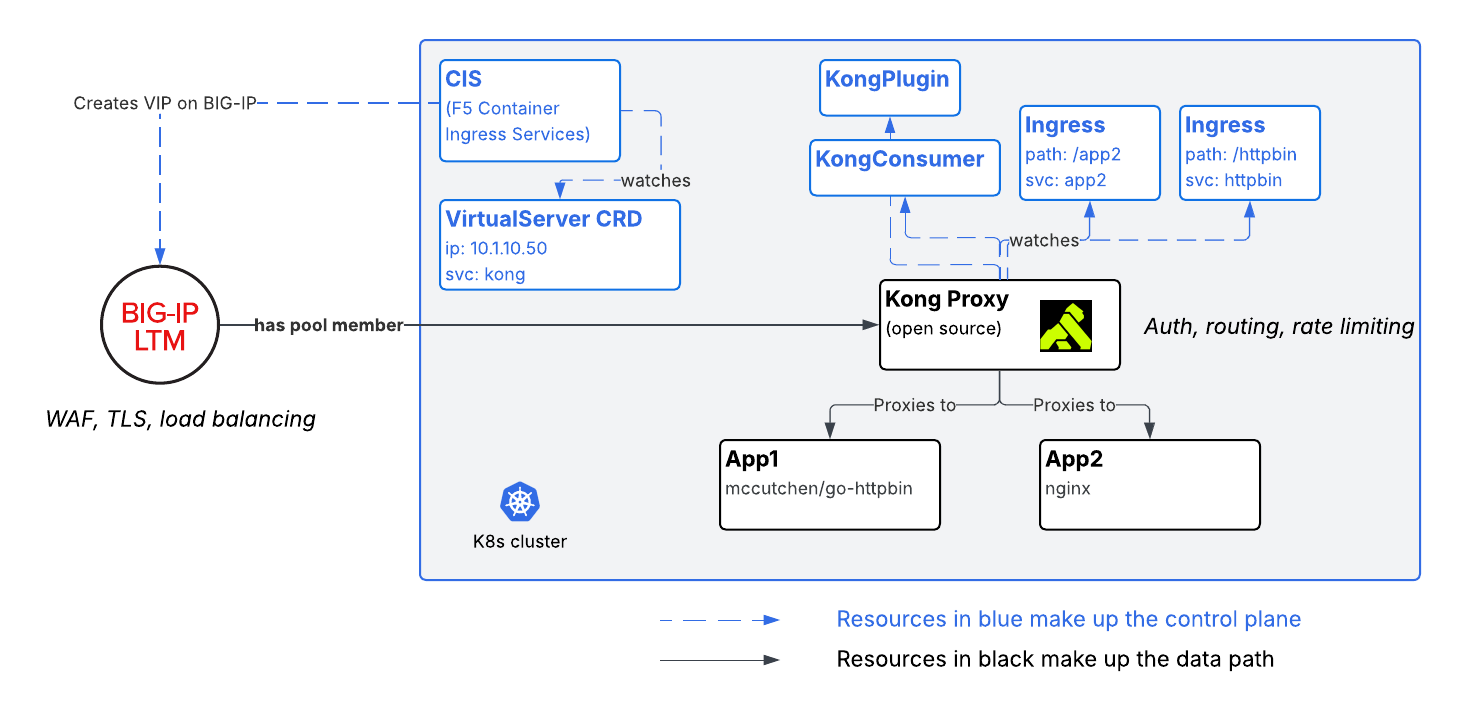
Often, an API gateway and F5 BIG-IP are complementary, not competing. They live at different layers of the stack and solve different problems. Put them together and you get a clean separation of concerns: the ADC owns the edge, the gateway owns API management.
For this article, I have chosen specific products to show configuration examples:
- For my Kubernetes (K8s) cluster, I’m using OpenShift
- For my API Gateway I’m using open source Kong
- For my ADC I’m using F5 BIG-IP
Of course, I could use a different K8s distribution (Rancher, AKS, GKE, etc) and a different API Gateway (NGINX, Gloo, Apigee, etc), and even a different ADC. The pattern is identical: F5 BIG-IP fronts the gateway, and the gateway fronts the services.
The split of responsibilities
The whole idea fits on one line:
1
2
client ──HTTPS──▶ F5 BIG-IP (TLS + WAF + LB) ──HTTP──▶ Kong (routing + rate-limit + auth) ──▶ backend apps
F5 BIG-IP — the edge / entry point:
- TLS termination. BIG-IP presents the TLS certificate, decrypts, and forwards as HTTP to Kong inside the cluster.
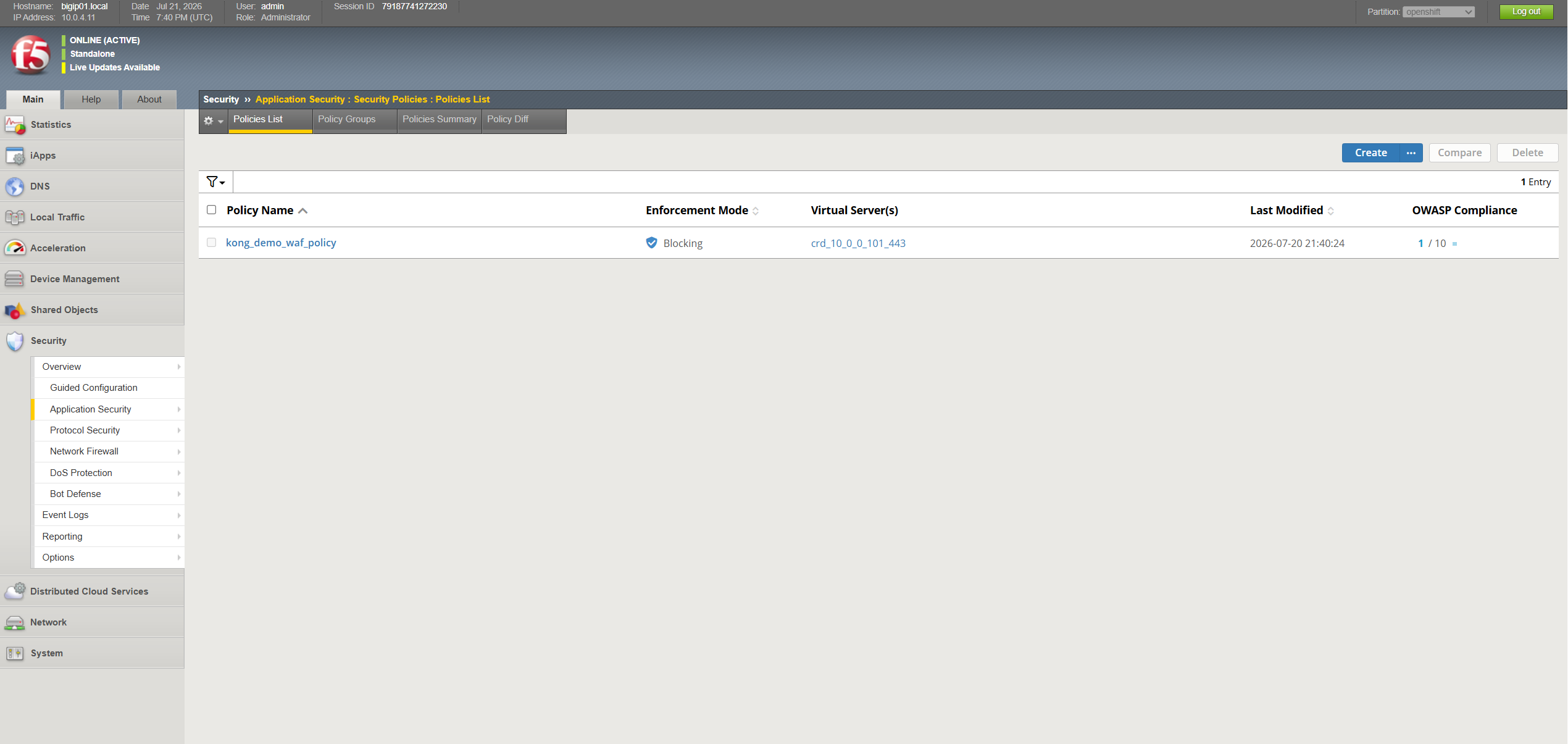
- Advanced WAF. L7 protection (SQLi, XSS, etc.) is enforced at the edge, before traffic reaches Kong.
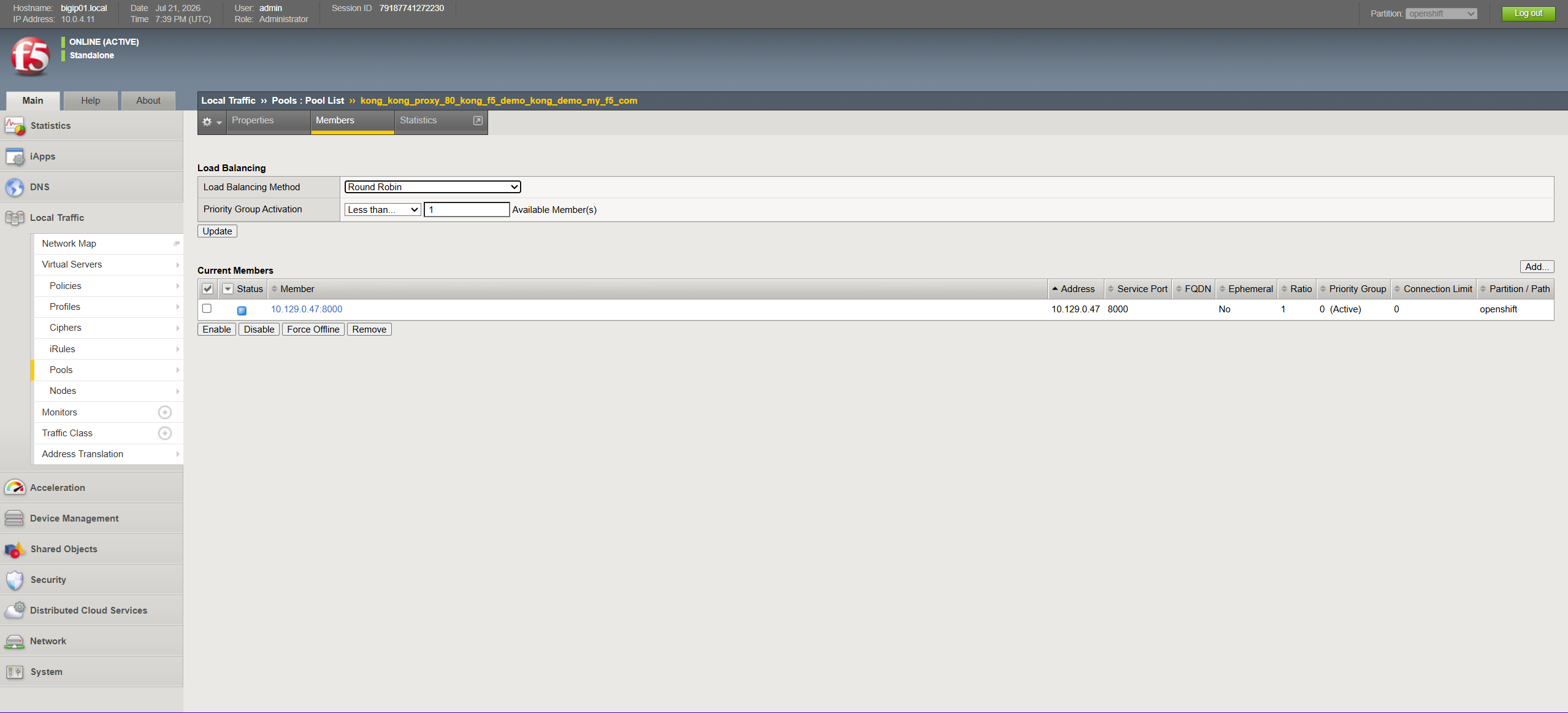
- Load balancing straight to pods. F5 Container Ingress Services (CIS) runs in cluster mode, so the BIG-IP pool members are the Kong proxy pod IPs.
Kong — behind F5, inside OpenShift:
- Request routing to backend services by path.
- Rate limiting per route.
- Authentication (here, API key / key-auth).
Notice there is no overlap. BIG-IP is not handling API keys; Kong is not performing WAF. Each can be operated by the team that owns it — NetOps/SecOps at the edge, the platform/API team inside the cluster.
The environment
Kong Gateway (open source) runs as a single Deployment kong-kong with replicas=1, installed via helm in namespace kong-f5-demo. The proxy Service is ClusterIP on purpose: the external entry point is BIG-IP, not the OpenShift router.
Two sample backends sit behind Kong:
- httpbin (
mccutchen/go-httpbin) exposed at/httpbin - app2 (
nginxserving a static page) exposed at/app2
BIG-IP integration is via CIS running inside the cluster watching custom resources. A WAF policy /Common/kong_demo_waf_policy already exists on the BIG-IP.
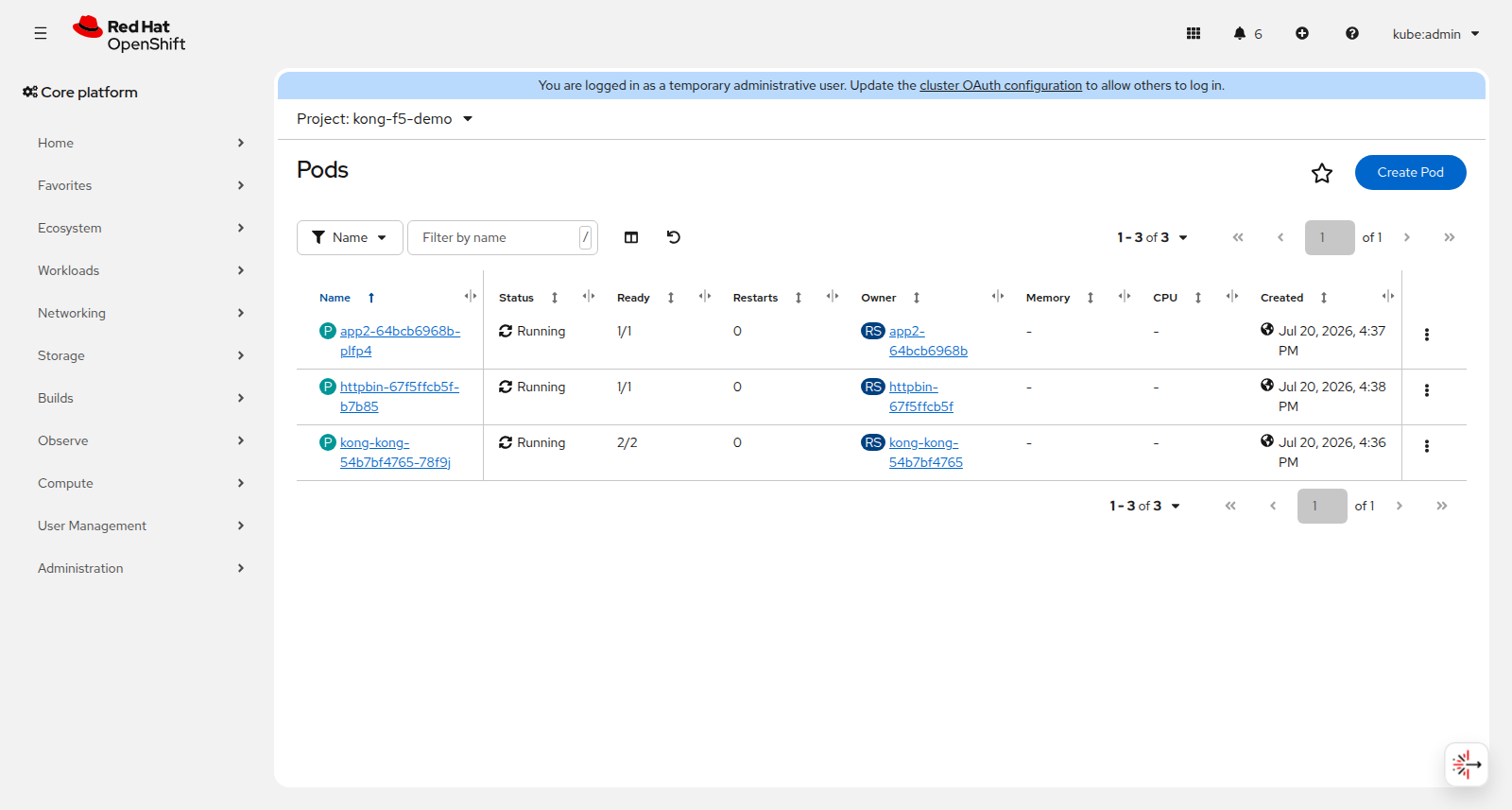
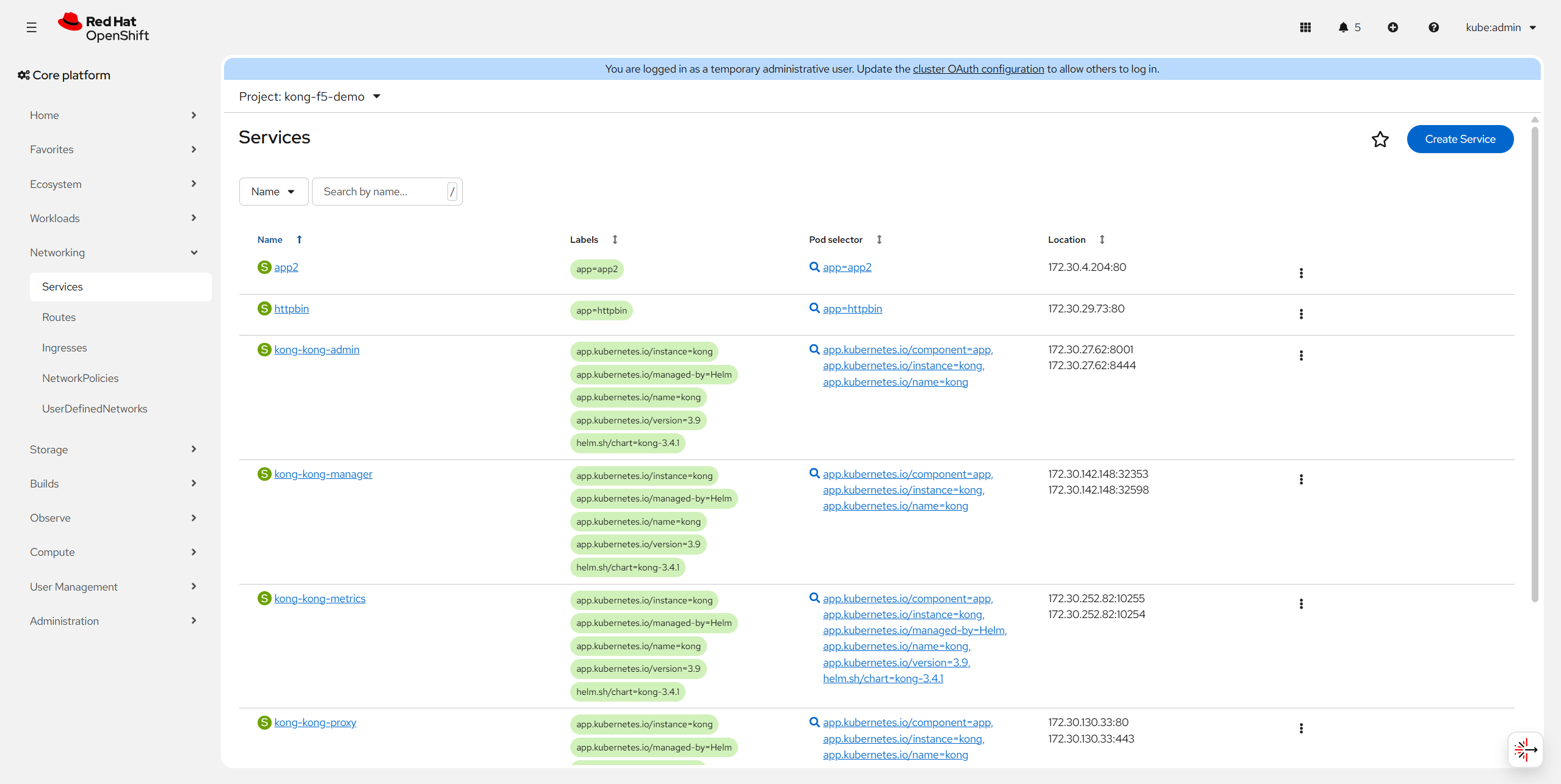
Here is the running namespace kong-f5-demo shown with CLI output and UI screenshots:
1
2
3
4
5
6
7
8
9
10
11
12
$ oc get pods -n kong-f5-demo -o wide
NAME                         READY   STATUS    RESTARTS   AGE     IP            NODE
app2-64bcb6968b-plfp4        1/1     Running   0          6h24m   10.129.0.49   ip-10-0-2-184...
httpbin-67f5ffcb5f-b7b85     1/1     Running   0          6h22m   10.129.0.50   ip-10-0-2-184...
kong-kong-54b7bf4765-78f9j   2/2     Running   0          6h24m   10.129.0.47   ip-10-0-2-184...

$ oc get svc -n kong-f5-demo
NAME              TYPE        CLUSTER-IP       PORT(S)
app2              ClusterIP   172.30.4.204     80/TCP
httpbin           ClusterIP   172.30.29.73     80/TCP
kong-kong-admin   ClusterIP   172.30.27.62     8001/TCP,8444/TCP
kong-kong-proxy   ClusterIP   172.30.130.33    80/TCP,443/TCP
The configuration
BIG-IP: one VirtualServer, one TLSProfile
BIG-IP is configured by CIS, which watches K8s custom resources. Two resources describe the BIG-IP config:
TLSProfile — TLS edge termination, referencing a K8s TLS secret that holds the cert for kong-demo.my-f5.com:
1
2
3
4
5
6
7
8
9
10
11
12
13
14
apiVersion: cis.f5.com/v1
kind: TLSProfile
metadata:
  name: kong-f5-demo-tls
  namespace: kong-f5-demo
  labels:
    f5cr: "true"
spec:
  hosts:
    - kong-demo.my-f5.com
  tls:
    termination: edge
    reference: secret
    clientSSL: kong-f5-demo-tls   # K8s TLS secret
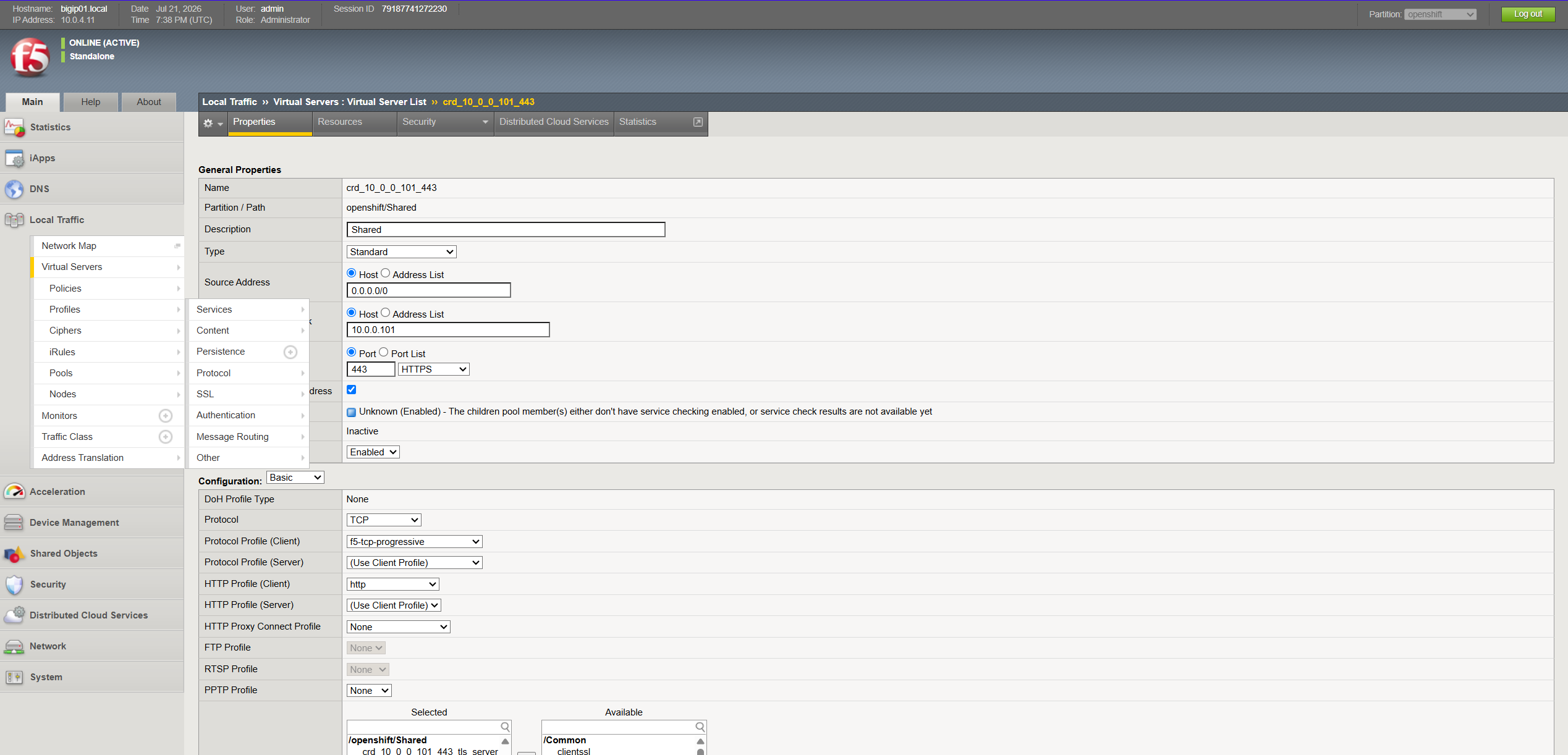
VirtualServer — Note the three F5 responsibilities in one object: the TLS profile, the WAF policy reference, and a pool that points straight at the Kong proxy Service (which CIS translates to pod IPs):
1
2
3
4
5
6
7
8
9
10
11
12
13
14
15
16
apiVersion: cis.f5.com/v1
kind: VirtualServer
metadata:
  name: kong-proxy-vs
  namespace: kong-f5-demo
  labels:
    f5cr: "true"
spec:
  host: kong-demo.my-f5.com
  virtualServerAddress: 10.0.0.101
  tlsProfileName: kong-f5-demo-tls # reference to TLSProfile object
  waf: /Common/kong_demo_waf_policy # reference to existing policy
  pools:
    - path: /
      service: kong-kong-proxy #pod IP's of this service become pool members
      servicePort: 80
That servicePort: 80 shows that BIG-IP VIP is listening on tcp/443 (HTTPS), decrypting, and forwarding to the pool on tcp/80 (HTTP).
Kong: Ingresses and Plugins
Kong is also configured the K8s-native way. Each backend gets an Ingress with ingressClassName: kong and konghq.com/strip-path: "true" (so /httpbin/get reaches the backend as /get). Policy is defined as KongPlugin objects and attached to routes with the konghq.com/plugins annotation.
Routing — one Ingress per backend:
1
2
3
4
5
6
7
8
9
10
11
12
13
14
15
16
apiVersion: networking.k8s.io/v1
kind: Ingress
metadata:
  name: httpbin
  namespace: kong-f5-demo
  annotations:
    konghq.com/strip-path: "true"
    konghq.com/plugins: rate-limiting-demo   # policy attached here
spec:
  ingressClassName: kong
  rules:
    - http:
        paths:
          - path: /httpbin
            pathType: ImplementationSpecific
            backend: { service: { name: httpbin, port: { number: 80 } } }
The app2 Ingress is identical in shape but points at the app2 Service on /app2 and attaches key-auth-demo instead.
Rate limiting — 10 requests/minute, local counter:
1
2
3
4
5
6
7
8
9
apiVersion: configuration.konghq.com/v1
kind: KongPlugin
metadata:
  name: rate-limiting-demo
  namespace: kong-f5-demo
plugin: rate-limiting
config:
  minute: 10
  policy: local
Authentication — API key carried in the apikey header, plus a consumer identity:
1
2
3
4
5
6
7
8
9
10
11
12
13
14
15
16
17
18
19
apiVersion: configuration.konghq.com/v1
kind: KongPlugin
metadata:
  name: key-auth-demo
  namespace: kong-f5-demo
plugin: key-auth
config:
  key_names: [ apikey ]
---
apiVersion: configuration.konghq.com/v1
kind: KongConsumer
metadata:
  name: demo-consumer
  namespace: kong-f5-demo
  annotations:
    kubernetes.io/ingress.class: kong
username: demo-consumer
credentials:
  - demo-apikey     # Secret holding the key value
Again — this is Kong syntax, but the concepts (routes, a rate-limit policy, a key-auth policy, a consumer) map onto every API gateway on the market.
Proving it works
All requests below go to https://kong-demo.my-f5.com, which resolves to the BIG-IP VIP 10.0.0.101.
1. TLS is terminated on the BIG-IP
The served certificate is the BIG-IP’s, with CN=kong-demo.my-f5.com:
1
2
3
4
$ curl -kv https://kong-demo.my-f5.com/httpbin/get 2>&1 | grep -E 'subject:|issuer:'
* SSL connection using TLSv1.2 / ECDHE-ECDSA-AES128-GCM-SHA256
*   subject: CN=kong-demo.my-f5.com
*   issuer:  C=US; O=Let's Encrypt; CN=YE2
2. The WAF blocks attacks before Kong sees them
A classic SQL-injection probe is stopped at the edge — HTTP 403 with the F5 block page:
1
2
3
4
5
6
7
8
$ curl -k -i "https://kong-demo.my-f5.com/httpbin/get?id=1' OR '1'='1'--"
HTTP/1.1 403 Forbidden
Content-Type: text/html; charset=utf-8
...
<html><head><title>Blocked by F5 BIG-IP WAF</title></head>
<body><h1>403 Forbidden</h1>
<p>Request blocked by F5 Advanced WAF before reaching Kong.</p>
<p>Support ID: 1487496205675004032</p></body></html>
An XSS attempt gets the same treatment:
1
2
3
4
$ curl -k -i "https://kong-demo.my-f5.com/httpbin/anything?q=<script>alert(1)</script>"
HTTP/1.1 403 Forbidden
...
<p>Request blocked by F5 Advanced WAF before reaching Kong.</p>
Rendered in a browser, the block page looks like this:

The key architectural point: Kong and the backends never process the malicious payload. The attack surface is reduced before the API-management layer.
3. Kong routes clean traffic to the backends
Legitimate requests sail through F5 and Kong routes them by path. /httpbin/get (strip-path turns it into /get):
1
2
3
4
5
6
7
8
9
$ curl -k https://kong-demo.my-f5.com/httpbin/get
{
  "args": {},
  "headers": {
    "Host": [ "kong-demo.my-f5.com" ],
    "User-Agent": [ "curl/8.18.0" ]
  },
  ...
}
4. Kong enforces rate limiting
The rate-limiting plugin caps /httpbin at 10 requests/minute. On every allowed request Kong returns the standard rate-limit headers, and once the budget is spent it returns HTTP 429 with a JSON body:
1
2
3
4
5
6
7
8
9
10
11
12
13
14
15
### RateLimit headers on a normal request:
RateLimit-Limit: 10
RateLimit-Remaining: 9
RateLimit-Reset: 26

### 12 requests inside one minute:
req  1 -> 200
req  2 -> 200
 ...
req 10 -> 200
req 11 -> 429
req 12 -> 429

### Body once the limit is exceeded:
{ "message": "API rate limit exceeded", "request_id": "d75e6d49..." }
Note: This example is hitting Kong proxy directly to show 429 responses. My WAF will re-classify Kong’s 429 response and serve its own 403 block page to the client. It’s a good illustration of the layering: the gateway decides “too many requests, send a 429” the edge decides “I see a 429 response but I’ll forward a 403 to the client”.
5. Kong enforces authentication
The /app2 route requires an API key.
1
2
3
4
5
6
7
8
9
10
11
12
13
14
# No key → Kong returns 401

curl -k -i https://kong-demo.my-f5.com/app2/
HTTP/1.1 401 Unauthorized
WWW-Authenticate: Key
Content-Type: application/json; charset=utf-8

{"message":"No API key found in request"}

# Key in `apikey` header → 200 and the app2 page:

curl -k -i -H "apikey: demo-secret-key-12345" https://kong-demo.my-f5.com/app2/
HTTP/1.1 200 OK
Content-Type: text/html; charset=UTF-8
Why this layering is worth it
Walk the request path one more time and note who owns each decision:
| Concern | Owned by | Where it runs |
|---|---|---|
| TLS termination / certs | F5 BIG-IP | Edge VIP 10.0.0.101:443 |
| L7 attack protection (WAF) | F5 BIG-IP | Edge, before the cluster |
| Load balancing to pods | F5 BIG-IP | Pool = Kong pod IPs |
| Request routing | API gateway (Kong) | In-cluster |
| Rate limiting | API gateway (Kong) | In-cluster, per route |
| Authentication | API gateway (Kong) | In-cluster, per route |
A few architectural advantages:
- Clean ownership boundaries. NetOps/SecOps manage the edge (certs, WAF policy, VIPs) via BIG-IP; the API/platform team manages routes and API policy via K8s objects. Neither steps on the other.
- Blast-radius reduction. SQLi/XSS/other L7 attacks are dropped at the edge.
- Direct-to-pod load balancing. CIS cluster mode means the BIG-IP balances across Kong pod IPs — no extra NodePort/router hop, and pool membership tracks pods automatically.
- Portability. Everything is configured using K8s resource, for both Kong and BIG-IP. The gateway is replaceable — the edge pattern doesn’t change.
Kong here is just the example. The architecture here is: let the ADC do TLS, WAF, and pod-level load balancing at the edge, and let your API gateway do routing, rate limiting, and auth. They’re better together.
Appendix — asset files
Raw CLI captures used above are saved alongside this article under blog-assets/:
cli-01-openshift-resources.txt— pods / services / ingress / plugins / CRscli-02-tls-termination.txt— served-cert subject/issuercli-03-waf-block.txt— SQLi + XSS 403 responsescli-04-routing.txt— httpbin + app2 200 responsescli-05-ratelimit.txt— rate-limit headers + 200→429 progression + 429 bodycli-06-keyauth.txt— 401 without key, 200 with keycli-07-manifests.txt— full VirtualServer / TLSProfile / Ingress / KongPlugin / KongConsumer manifests